A custom Linux kernel built from the mainline Linux 7.2 source with CachyOS patches, BBR v3 and ntsync. Two flavours — linuxlite for everyday desktop use and linuxlite-gaming for low-latency gaming through Wine and Proton.
The Linux Lite kernel is a custom Linux kernel built specifically for desktop and gaming use on everyday hardware. We build it ourselves from the mainline Linux kernel — currently 7.2 — downloaded direct from kernel.org and GPG-verified against the official kernel signing keys, then add a curated selection of the popular CachyOS kernel patches together with targeted configuration tuning to deliver a faster, smoother, lower-latency Linux experience out of the box. The configuration from the Ubuntu 26.04 LTS kernel is carried forward on top of the mainline source, so every driver and hardware feature you rely on is retained.
Two kernel flavours are available. The default linuxlite kernel is tuned for general desktop use and is what every Linux Lite installation boots into. The optional linuxlite-gaming kernel is offered after setup and is tuned for low input lag, smoother frame pacing and better Linux gaming performance — making it one of the best Linux kernels for gaming on supported hardware. See our full Linux Lite kernel comparison for a side-by-side breakdown of every setting.
The Two Linux Lite Kernels
linuxlite — the default Linux desktop kernel
The standard linuxlite kernel is what every Linux Lite installation boots into. This desktop Linux kernel prioritises a smooth, responsive everyday experience for web browsing, office work, media playback, software development and general multitasking, while keeping CPU overhead low and battery life high on laptops.
linuxlite-gaming — the optional low-latency Linux gaming kernel
The linuxlite-gaming kernel goes further to reduce input lag and improve frame delivery. It is the recommended Linux gaming kernel for users who play games regularly through Steam, Wine or Proton, and is also a strong choice for audio production, video editing and VR where timing matters. The gaming kernel can be installed at any time after setup without removing or replacing the default desktop kernel.
CachyOS Kernel Patches Included in Linux Lite
Both Linux Lite kernels include a hand-picked subset of the popular CachyOS kernel patchset for the matching kernel version (currently Linux 7.2), chosen for stability, broad hardware compatibility and measurable benefit on real desktop and gaming workloads:
CachyOS patch
Area
What it does in the Linux Lite kernel
amd-pstate
CPU
AMD P-State preferred-core scheduling — steers performance-sensitive work to the fastest cores on Ryzen
bbr3
Network
TCP BBR v3 congestion control with improved fairness and bandwidth estimation
gaming-sched
Scheduler
CachyOS scheduler tuning on top of EEVDF for lower latency and smoother interactive response
preempt-ipi
Scheduler
Lower-latency preemption using targeted IPIs, reducing worst-case scheduling delay
ksm
Memory
Kernel Samepage Merging improvements with per-process controls
fixes
General
Curated upstream fixes: scheduler tweaks, USB device quirks, Bluetooth (btusb), Intel i915 GT, Realtek audio (ALC269)
hdmi
Graphics
HDMI display fixes for AMD GPUs (amdgpu_dm) — better mode setting and EDID handling
vesa-dsc-bpp
Graphics
VESA Display Stream Compression bits-per-pixel improvements for AMD displays
snd-codecs
Audio
Additional sound-codec support for newer laptop and desktop audio hardware
t2
Hardware
Apple T2 Mac support (keyboard, trackpad, audio and storage on T2-equipped Macs)
The broad cachy base patch (CachyOS-specific branding and sweeping sched/mm changes) is deliberately skipped — it is too invasive for a stable mainstream distribution — along with the experimental misc/ extras and the alternative sched/ schedulers (PRJC, BORE, sched-ext). On Linux 7.2 the standalone BORE scheduler is not used; the CachyOS gaming-sched tuning on top of mainline EEVDF provides the interactive and gaming responsiveness instead. The exact patch set is refreshed to match each new mainline kernel version.
What Makes the Two Linux Lite Kernels Different
CPU Scheduler — EEVDF with CachyOS tuning
The Linux scheduler decides how to share the processor between running programs. Both Linux Lite kernels use the modern EEVDF scheduler, which gives each program a fair and timely share of the CPU.
On top of EEVDF, both kernels add the CachyOS gaming-sched tuning together with the preempt-ipi patch. These bias the scheduler toward interactive, bursty work — a desktop application repainting a window, or a game processing a frame — and cut the worst-case delay before a waiting task gets the CPU, keeping desktop and gaming workloads feeling snappy even under heavy background load.
The two Linux Lite kernels differ in how aggressively the scheduler can interrupt running work:
linuxlite uses dynamic preemption, balancing throughput and responsiveness by switching modes at runtime.
linuxlite-gaming uses full preemption, allowing the kernel to interrupt almost any task immediately. This reduces the worst-case delay before a game or audio application gets CPU time — a key factor in low-latency Linux gaming.
Timer Resolution
Both Linux Lite kernels run the internal system timer at 1000 Hz (1000 ticks per second) instead of the Ubuntu default of 250 Hz. The kernel checks in on running tasks four times more often, reducing the maximum time a program waits before being scheduled — particularly noticeable in audio, video and gaming workloads.
Scheduler Latency Targets
linuxlite targets a scheduling window of 6 ms — enough headroom for smooth multitasking without wasting CPU cycles.
linuxlite-gaming targets 3 ms, halving the window so games and interactive applications respond faster.
Memory Management
ZRAM Compressed Swap in RAM
Both Linux Lite kernels enable ZRAM, which creates a compressed swap area in RAM itself. When the system runs low on memory, less-used data is compressed and kept in RAM rather than written to a slower disk. ZRAM keeps Linux Lite responsive on older PCs and laptops with modest amounts of RAM.
ZSWAP with Zstd Compression
ZSWAP intercepts data before it reaches the swap partition and compresses it first. Both Linux Lite kernels enable Zstd compression as the default ZSWAP compressor (CONFIG_ZSWAP_COMPRESSOR_DEFAULT_ZSTD), which is fast and achieves excellent ratios — a major upgrade over the older LZO format. Linux 7.2 ships an up-to-date Zstd library used across ZSWAP, ZRAM, Btrfs and squashfs.
Kernel Samepage Merging (KSM)
Both Linux Lite kernels enable Kernel Samepage Merging (KSM) with per-process prctl() controls (upstreamed in mainline Linux). KSM identifies identical memory pages across processes and merges them into a single copy, freeing RAM. This is particularly effective when running multiple instances of the same application, virtual machines, or Windows games via Wine or Proton, where many processes share common data.
Transparent Huge Pages
Modern processors work more efficiently when memory is allocated in larger blocks. Both Linux Lite kernels enable Transparent Huge Pages (THP), which does this automatically without changes from applications.
linuxlite uses on-demand mode — large pages are allocated when a program requests them via madvise.
linuxlite-gaming uses always-on mode — large pages are used wherever possible, benefiting games that work with large textures and asset data.
Networking
BBR v3 TCP Congestion Control
Both Linux Lite kernels include BBR v3 via the CachyOS 0002-bbr3 patch — the latest version of Google’s Bottleneck Bandwidth and Round-trip propagation time algorithm. BBR v3 improves on earlier versions with fairer behaviour when sharing links with traditional TCP flows and more accurate bandwidth estimation. It keeps connections moving efficiently and is particularly effective on lossy links such as Wi-Fi, mobile broadband and online gaming connections. The default sysctl profile sets net.ipv4.tcp_congestion_control=bbr.
FQ Queue Discipline
Fair Queueing (FQ) is set as the default network packet scheduler (net.core.default_qdisc=fq). It spreads network traffic fairly across connections so that one busy download does not starve other traffic, keeping latency low for interactive use such as voice chat, video conferencing and online gaming.
Storage
MQ-Deadline I/O Scheduler
Both Linux Lite kernels enable the MQ-Deadline I/O scheduler (CONFIG_MQ_IOSCHED_DEADLINE) for storage devices. It prioritises read requests (which applications usually wait for directly) over write requests (which can be queued), and ensures nothing waits too long. This is a strong general-purpose choice for SSDs, NVMe drives and traditional HDDs alike.
Kyber Scheduler (gaming kernel only)
The linuxlite-gaming kernel additionally enables the Kyber I/O scheduler (CONFIG_MQ_IOSCHED_KYBER=y), giving you an additional low-latency scheduler option for fast NVMe drives during gaming sessions. The desktop kernel disables Kyber to keep the I/O path lean.
CPU Features
AMD P-State Preferred Core Scheduling
Both Linux Lite kernels include mainline AMD P-State preferred-core scheduling on Ryzen processors. The kernel is made aware of which cores on the CPU are the fastest (due to silicon quality variation) and preferentially schedules performance-sensitive work on those cores. This delivers a measurable improvement in single-threaded and lightly-threaded workloads on supported AMD systems, with no effect on Intel or older AMD hardware.
AES-NI / AVX-512 Cryptography
Linux 7.2 ships optimised AES-NI and AVX-512 AES code paths in the mainline crypto subsystem. On supported processors (most modern AMD and Intel chips), encryption and decryption operations — used by disk encryption (LUKS), network encryption (TLS, WireGuard) and filesystem checksums — run significantly faster.
AMD ISP4 Webcam Driver
Mainline Linux 7.2 includes the AMD Image Signal Processor v4 driver, enabling the integrated MIPI webcam on modern Ryzen AI / Phoenix and newer laptops that previously had no working internal camera under Linux.
HDMI and VESA DSC Display Improvements
The CachyOS hdmi patch fixes HDMI mode setting and EDID handling on AMD GPUs (amdgpu_dm), and the vesa-dsc-bpp patch improves VESA Display Stream Compression bits-per-pixel selection — together resolving display flicker, blank screens and incorrect refresh rates on a number of AMD-driven HDMI and DisplayPort monitors.
Utilisation Clamping (UCLAMP)
Both Linux Lite kernels support UCLAMP, which lets the system set minimum and maximum CPU performance targets for individual tasks or groups of tasks. UCLAMP is used by compositors and audio servers to ensure they always get the CPU headroom they need, even on low-power hardware.
Latency Nice
Latency Nice extends the standard Linux process priority system. Programs can declare how sensitive they are to scheduling delays, independently of how much CPU they use. A compositor running at a low latency-nice value will be scheduled with low delay even if it is not CPU-intensive.
NUMA Balancing
On systems with multiple processor sockets or complex memory layouts, NUMA balancing automatically moves tasks and their data closer together in memory. This is a no-cost improvement on supported hardware and has no negative effect on single-socket consumer systems.
Security
Speculative-Execution Mitigations
The desktoplinuxlite kernel keeps the full set of CPU speculative-execution mitigations enabled, exactly as mainline Linux 7.2 ships them — including the in-tree mitigation for the vmscape vulnerability (cross-VM/host data leakage on affected Intel and AMD processors).
The gaminglinuxlite-gaming kernel is deliberately built with these CPU mitigations disabled (CONFIG_CPU_MITIGATIONS=n) for maximum throughput and lowest latency — the usual trade-off made by performance- and gaming-focused kernels, and also what allows the proprietary NVIDIA driver to build cleanly on the newer mainline kernel. If you prefer mitigations on, simply stay on the default desktop kernel.
Curated Upstream Fixes
The CachyOS fixes patch bundles a set of small upstream fixes that haven’t yet landed in a stable kernel point release: scheduler tweaks (including ASLR-related changes), USB device quirks, Bluetooth USB (btusb) fixes, Intel i915 GT improvements and Realtek ALC269 audio codec fixes — all of which improve day-to-day reliability on real hardware.
Kernel Updates and Security Patches
Security and stability fixes reach your system as new kernel packages published to the Linux Lite repository. When upstream ships a new mainline point release (for example 7.2.1, 7.2.2 and so on — where kernel.org’s stable and security fixes land), we rebuild the Linux Lite kernel from that release with the refreshed CachyOS patch set and publish it for both flavours.
The Lite Kernel Manager is how you receive those updates. Each time you open it, it checks the repository for the latest build and displays an “Update available” banner when your installed kernel is behind; one click installs the new kernel (and matching headers) for your current flavour. The previous kernel is kept installed and remains in the GRUB boot menu, so you can roll back at any time if needed. In other words, Lite Kernel Manager handles installing, switching and updating the Linux Lite kernels — it is not limited to first-time installation.
Linux Gaming and Windows Compatibility
NT Synchronisation Primitives (ntsync) for Wine and Proton
Linux 7.2 ships ntsync — NT synchronisation primitives — in the mainline kernel (originally upstreamed in Linux 6.14). These are the low-level locking and signalling mechanisms used by Windows applications. When running Windows games through Wine or Proton (Steam Play), these operations were historically emulated in userspace, which added overhead. With ntsync now in the kernel, they are handled directly — reducing CPU overhead and improving frame rates and frame pacing in Windows games on Linux. This is one of the biggest single wins for Linux gaming performance available today, and it works out of the box on both Linux Lite kernels.
Tools Included with the Linux Lite Kernel
linuxlite-bench — the Linux Lite Kernel Benchmark
linuxlite-bench is the command-line benchmark behind the Run Benchmark button in the Lite Kernel Manager. It measures real-time scheduler latency (via cyclictest from rt-tests) and GPU throughput (via glmark2), then recommends which Linux Lite kernel is the better fit for your hardware — desktop or gaming — with a confidence rating.
Results are saved to ~/.local/share/linuxlite/bench-$(uname -r).log along with a machine-readable recommendation.json, so you can compare benchmarks across kernel versions over time. From the Lite Kernel Manager you can upload your result to the public Linux Lite Benchmark Database with a single click.
Linux Lite Benchmark Database
The community-driven Linux Lite Benchmark Database at linuxliteos.com/benchmark.php aggregates anonymised linuxlite-bench results uploaded from Lite Kernel Manager around the world. It lets you:
Compare your hardware’s scheduler latency and GPU score against similar machines
See whether the desktop or gaming kernel typically performs best on your CPU/GPU combination before you install
Track how Linux Lite kernel updates affect real-world performance over time
Help other users on similar hardware by contributing your own anonymised results
Uploads include kernel version, scheduler latency, GPU score and basic hardware identifiers only — no personal information is sent.
auto-profile.sh
Applies the matching set of kernel tuning values at runtime. Run as root after switching kernels to activate the appropriate profile without rebooting.
The Lite Kernel Manager (lite-kernel-manager) is the official GTK 3 graphical tool for managing Linux Lite kernels — install, switch, benchmark and tune your desktop or gaming kernel without ever opening a terminal. It is shipped as the lite-kernel-manager and integrates rt-tests and glmark2 software recommended for benchmarking. Privileged operations (kernel install, removal, GRUB default change) are mediated by a PolicyKit policy (com.linuxlite.kernelinstall.policy) so you only authenticate when you actually need to.
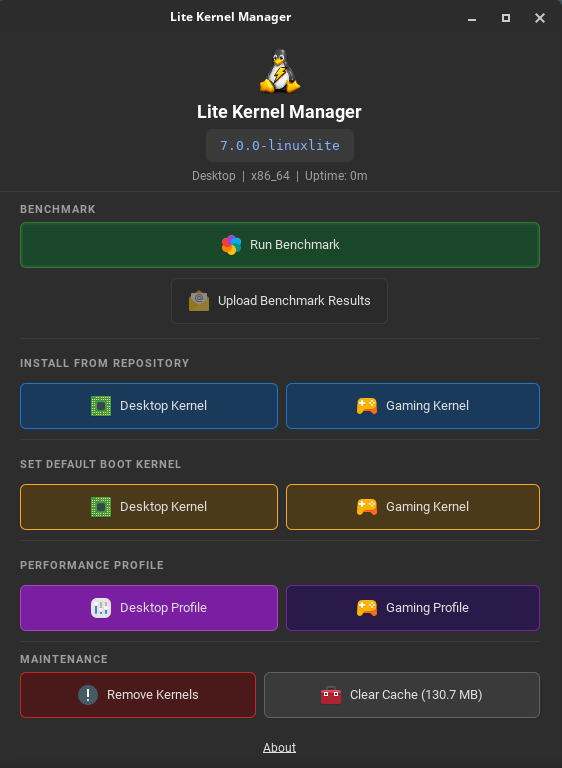
Lite Kernel Manager — the Linux Lite kernel control centre, showing the running kernel (7.2.0-linuxlite), benchmark, install, boot-default and performance-profile actions.
The Lite Kernel Manager window is organised into five clear sections, each addressing a single common task:
Benchmark — Run Benchmark launches the linuxlite-bench scheduler-latency and GPU benchmark on your hardware, displays the recommended kernel (Desktop or Gaming) with a confidence rating, and saves the result locally. Upload Benchmark Results publishes your anonymised result to the public Linux Lite Benchmark Database, helping the community compare hardware and kernel performance over time.
Install From Repository — one-click installation of the Desktop Kernel (linuxlite) or Gaming Kernel (linuxlite-gaming) directly from the Linux Lite kernel repository (repo.linuxliteos.com). The Manager downloads the latest signed packages, verifies them, and rebuilds any third-party DKMS modules (NVIDIA, VirtualBox, etc.) for the new kernel automatically.
Set Default Boot Kernel — switch the kernel that GRUB boots into by default with a single click. The previously default kernel is preserved as a fallback in the boot menu, so a bad boot is never more than one reboot away from being undone.
Performance Profile — apply the matching sysctl tuning at runtime via auto-profile.sh. The Desktop Profile uses kernel.sched_latency_ns=6 ms, min_granularity_ns=750 μs, wakeup_granularity_ns=500 μs for balanced multitasking. The Gaming Profile tightens these to 3 ms / 400 μs / 300 μs for lower input lag and smoother frame pacing. Both profiles also enforce tcp_congestion_control=bbr and default_qdisc=fq for low-latency networking.
Maintenance — Remove Kernels safely uninstalls older Linux Lite kernels (the running and default boot kernels are always protected from accidental removal). Clear Cache reports the current cache footprint and frees disk space used by previous kernel downloads in a single click.
A header strip across the top of the window shows the current kernel version (e.g. 7.2.0-linuxlite), the active profile (Desktop or Gaming), the architecture (x86_64), and the system uptime — so you can confirm at a glance which Linux Lite kernel and tuning are actually running.
Sysctl Profiles
Two configuration files are provided for permanent tuning. Copying the appropriate file to /etc/sysctl.d/ applies the profile automatically on every boot.
File
Profile
99-linuxlite-desktop.conf
Balanced desktop settings
99-linuxlite-gaming.conf
Low-latency gaming settings
How to Install the Linux Lite Gaming Kernel
After Linux Lite is installed, a setup window appears on first login offering to install the gaming kernel. Clicking Install Gaming Kernel handles everything automatically:
Installs the linuxlite-gaming kernel packages
Rebuilds any third-party drivers (NVIDIA, VirtualBox, etc.) for the new kernel
Updates the GRUB boot menu
The default kernel is not changed or removed. If the gaming kernel ever causes an issue, simply reboot and select the standard linuxlite kernel from the boot menu — everything continues to work exactly as before.
To install or switch a Linux Lite kernel manually at any time, run the installer (it auto-escalates to root and prompts interactively if no flavour is given):
The installer guarantees the existing kernel and all of its DKMS modules are never touched, the GRUB default boot entry is not changed, and DKMS modules are rebuilt only for the new kernel.
Safety and Rollback
The boot menu default is never changed automatically. The original kernel always remains the fallback.
Third-party drivers (DKMS modules) are rebuilt for the new kernel independently. Drivers for the original kernel are not touched.
If the gaming kernel is declined during setup, it will not be offered again. It can still be installed manually at any time via the Lite Kernel Manager.